Upstream: crates/rune-kit/README.md § App shell at
65f8eb43f710, MIT © Anomaly. Bundled by build-rune-apps; links point at this snapshot or at GitHub at that rev.
App shell
rune_kit::shell is a desktop window's frame: a resizable, collapsible sidebar, the main pane
under a toolbar, and an optional inspector. It uses only rune's and rune-kit's public API.
// state: sidebar: PaneState, inspector: PaneState (saved and restored by the app)
let sidebar = Sidebar::new()
    .header(SidebarRow::new("New session").icon(&PLUS).build(k).key("new"))
    .section(SidebarSection::new("Today").count(n).collapsed(s.today_closed)
        .on_toggle(|s: &mut App, _| s.today_closed ^= true)
        .rows(today.iter().map(|x| SidebarRow::new(&x.title).detail(&x.age)
            .selected(s.selected == x.id).on_select(select(x.id)).build(k).key(x.id.clone()))))
    .footer(settings_row)
    .build(k);
SplitView::new(main)
    .sidebar(&s.sidebar, |s: &mut App| &mut s.sidebar, sidebar)
    .inspector(&s.inspector, |s: &mut App| &mut s.inspector, details)
    .toolbar(Toolbar::new().title(title).trailing(inspector_button))
    .titlebar_inset(cx.titlebar_inset())
    .build(k)
PaneState::new(width).range(min, max)is the app's: widths clamp and round, dragging a pane's inner edge resizes it, a double-click resets it, and dragging below half the minimum collapses it. Panes open and close onk.motion.disclosure(shorter for narrow panes) and snap under Reduce Motion.shell::is_sidebar_toggle(ev)matches ⇧⌘B (and ⌃⌘S on macOS); call it fromAppSpec::on_key.- A 48 point band across the top drags the window. Its leading end clears the traffic lights
(
Cx::titlebar_inset, 0 in full screen), and the sidebar's toggle sits past them. Place the lights in the band's middle withChrome { traffic_lights: Some((16.0, 17.0)), .. }. - The sidebar's list is one Tab stop: Up and Down move the selection, Home and End, typing a
row's first letters jumps to it, Return presses. Rows indent with
.depth(n), take an icon, a faint detail (a time), a badge or any trailing element, and rename in place with.renaming(&edit, access, commit, cancel).Sidebar::virtual_rowsbuilds only the rows near the viewport, for long histories; mixSidebarHeaders into the flattened list for sections. Toolbarhas leading, centre (ortitle) and trailing slots, and.material(..)backs it with a system material.
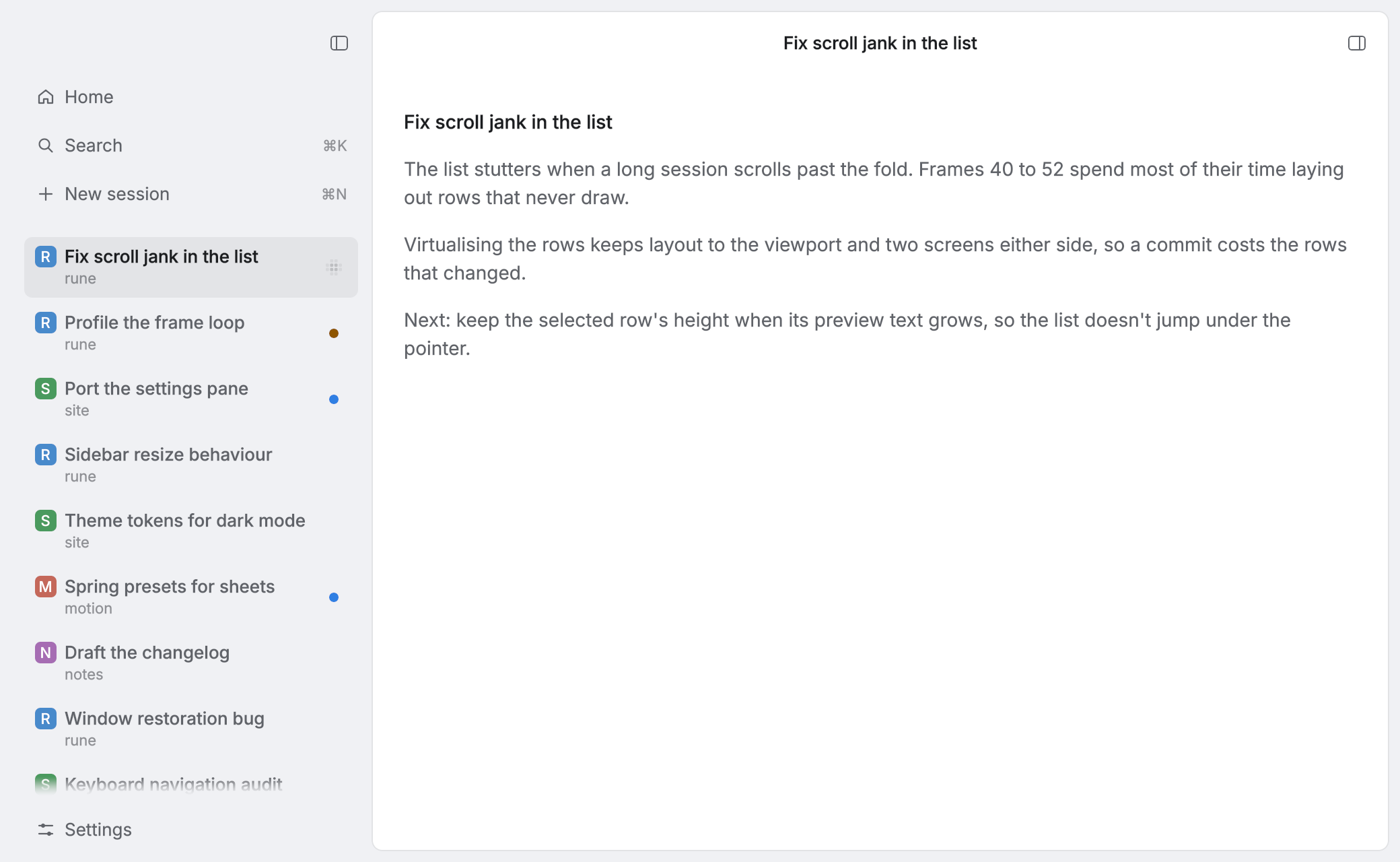
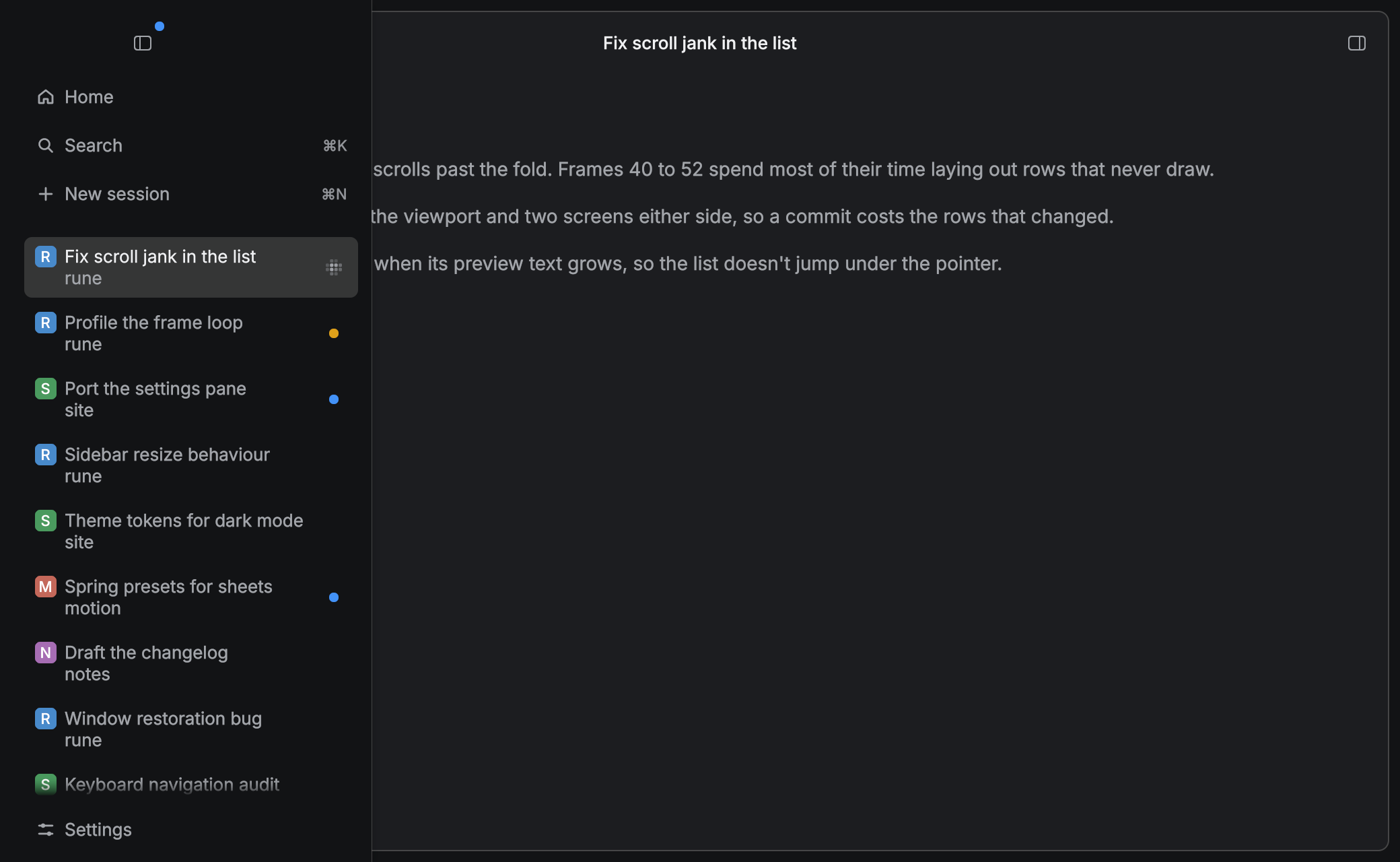
Every size and timing is a setting. A desktop agent-chat app's sidebar sets these (the example uses the same values):
SplitView::new(main)
    .sidebar(&s.sidebar, |s: &mut App| &mut s.sidebar, sidebar)   // PaneState::new(276.0).range(136.0, 640.0)
    .toolbar(toolbar)
    .titlebar_inset(cx.titlebar_inset())
    .frame_inset(8.0)
    .toolbar_in_panel()
    .sidebar_padding(18.0, 10.0)
    .sidebar_toggle(SidebarToggle::new().size(ControlSize::Large).past_lights(16.0).edge(18.0).gap(4.0)
        .in_header().unread(any_unread))
    .pane_motion(PaneMotion::new().spring(Spring::new(0.3, 0.0)).scale_with_width(480.0, 0.15, 0.3).fade_tail(0.15))
    .sidebar_peek(SidebarPeek::new().edge(16.0, ms(40)).toggle_delay(ms(80)).below(56.0))
    .reduced_motion(cx.is_reduced_motion())
    .build(k)

// Its rows: 45 points, an avatar over a muted project line, a status that turns into a close
// button under the pointer, and drag to reorder.
SidebarRow::new(&x.title).height(45.0).avatar(avatar(x)).subtitle(&x.project)
    .status(RowStatus::Unread).on_close(close(x.id))
    .reorder(&s.reorder, i, n, |s: &mut App| &mut s.reorder, |s: &mut App, from, to| move_row(s, from, to))
PaneMotionmoves both panes on one spring (the sidebar's), so they move as one;scale_with_width(w, min, max)scales its duration bysqrt(width / w), clamped, andfade_tail(f)fades the contents over the lastfof the travel.SidebarPeekslides the closed sidebar over the content, floating, when the pointer rests on the leading edge or on the toggle. Leaving it (pasthold's margin and grace) closes it; a click inside docks it. Under Reduce Motion it fades in place.SidebarToggle::in_headerputs the toggle at the end of the sidebar's title row while it is open; it travels past the traffic lights on the sidebar's spring as it closes.unreadmarks it with a dot while closed.SidebarRow::reorderlifts the row above its neighbours and follows the pointer; they step aside on springs, a drop calls the app's move, and Escape or losing focus puts it back. It works invirtual_rowslists too.- Rune's
El::raise,El::offsetandEl::hover_delaysdo the floating, the stepping aside and the resting, andKit::interactivegives an app's own elements the rows' hover look.
cargo run -p rune-kit --example shell shows a mock app (-- virtual for 5,000 rows).
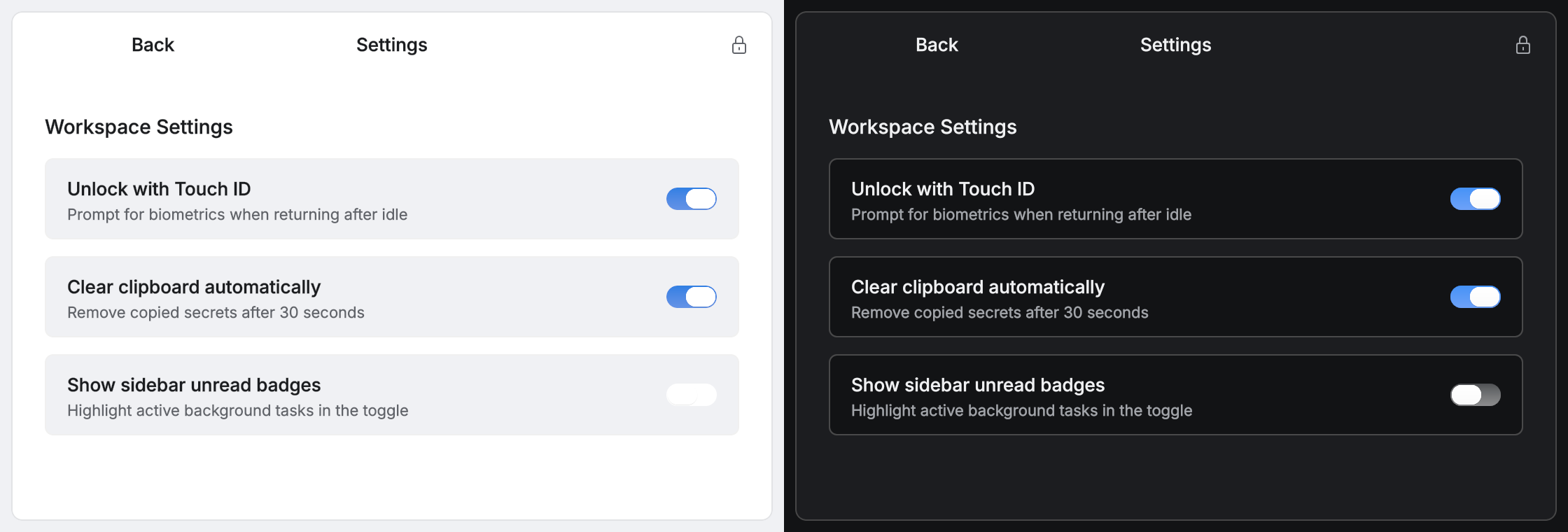
For full-window screens in the same window (a settings page or lock screen), shell::Page
shares SplitView's toolbar height, traffic-light clearance, window-drag band and framed
content card so switching screens matches pixel for pixel:
Page::new(content).title("Settings").leading(back).trailing(lock).titlebar_inset(cx.titlebar_inset()).build(&kit).
To move a hand-built sidebar over, keep its rows' data and selection, replace the column, its
scroll and focus group with Sidebar, each row with a SidebarRow keyed by the item's id, and
the width field and resize handlers with a PaneState given to SplitView::sidebar. Drop the
app's own titlebar spacer and drag region: the split view draws both.